-
NetScaler Commands – Check policy hits
When troubleshooting NetScalers, administrator may need to check which policies take effect when users connects. You will need to connect to the NetScaler using PuTTy or your favorite tool that does the same job. The below command could be run to provide that information. cd /var/logs nsconmsg -d current -g pol_hits
-
Storefront Multi-Site and High Availability – Guidelines for an Active-Active datacenter design
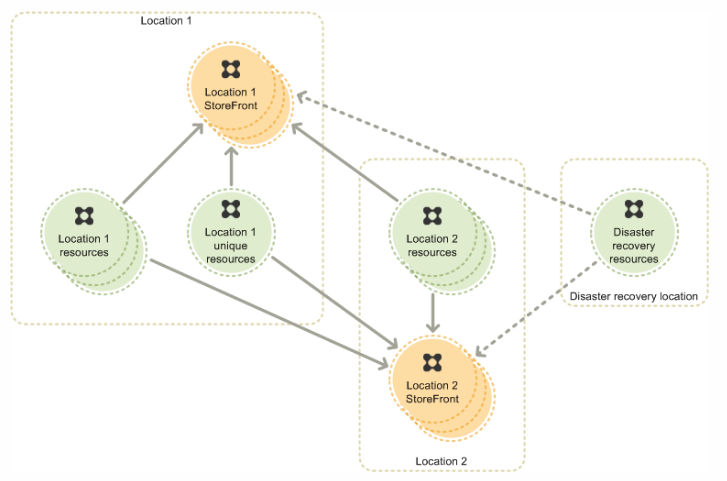
I am currently working on a XenDesktop 7.6 project that is designed to span 2 datacenters, Auckland and Sydney. One of the critical customer requirement is to redirect the user connections to their primary site regardless of their location first and failover to secondary site if the primary site is down. They also have a…
-
PVS Internals 1 – cache manager | Citrix Blogs
Here is an amazing blog from Martin Zugec from Citrix on PVS memory sizing. A must read for a PVS enthusiast… PVS Internals 1 – cache manager | Citrix Blogs.
-
CTX141751 – Citrix Receiver Diagnostics Tool – For Windows – Citrix Knowledge Center
It doesn’t get any better than this. Citrix has released a purpose-built diagnostic tool for capturing Receiver traces and analysis via CDF decoding tools.. Have a look at the below link.. CTX141751 – Citrix Receiver Diagnostics Tool – For Windows – Citrix Knowledge Center.
-
Using XPERF to troubleshoot slow logons
Installing XPERF to capture a slow boot or logon trace Install XPERF from the Windows SDK for Windows 7 and .NET Framework on the slow boot or logon computer. Hint 1: It is possible to install only the Windows Performance Toolkit from the Windows SDK. Hint 2: I suggest installing the WPT in an X:\XPERF…

By Lal Mohan
 Citrixology